
Messages, alerts and advice in the Heliciel software: understanding the Alerts tab
The messages, alerts and advice of the Heliciel software appear in the Alerts tab: Heliciel diagnoses the results at each rebuild and tells you which improvements to your parameters could avoid design errors. When a message points to the rotation speed, we start by searching for the optimum speed, before touching the geometry of the propeller. With a little experience, you will quickly find which parameters are at fault.
In this page:
- The Alerts tab: errors, warnings and messages
- Reading a propeller construction error message
- First cause: an unsuitable rotation speed
- Searching for the optimum rotation speed
1 : The Alerts tab: errors, warnings and messages
After the propeller is rebuilt, the title of the Alerts tab shows the number of messages to read. Before looking at the performance of our propeller, let us see what is wrong.
Heliciel sorts the messages into three sub-tabs: Errors, Warnings and Messages. An error designates an impossible geometry, as in the example of the next section; warnings and messages point out results to watch and give advice. Different types of messages and solutions are offered according to the faults observed.
2 : Reading a propeller construction error message
Here is a boat propeller whose geometry is impossible. The 3D view menu even offers to stop the rotation so you can examine the blade.
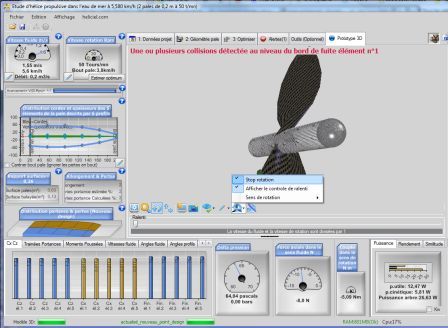
The 3D view of a boat propeller, with at the top the collision message detected at the trailing edge of element no. 1.
In the Alerts tab, the message gives the cause and the paths to a fix.
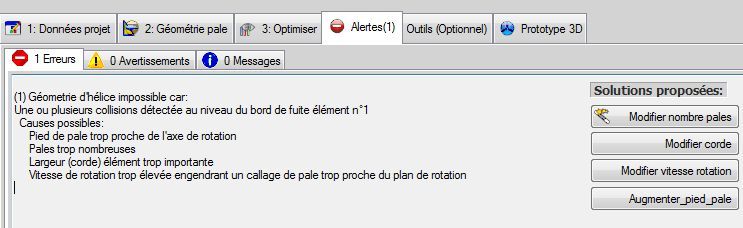
The « impossible propeller geometry » error: collisions detected at the trailing edge of element no. 1. Possible causes are a blade root too close to the axis of rotation, too many blades, a chord that is too wide, or a rotation speed so high that the pitch angle gets too close to the plane of rotation. On the right, the « Solutions proposées » (proposed solutions) buttons designate each setting to revisit.
This screen brings two useful pieces of information. First the possible causes, ranked from the simplest to the most structural. Then solution buttons (change the number of blades, change the chord, change the rotation speed, increase the blade root), one per setting to revisit. For the last one, see the blade root radius.
3 : First cause: an unsuitable rotation speed
One of the most common construction defects is an unsuitable rotation speed. When you meet messages that point to the speed, start with a search for the optimum speed, before changing the geometry of your propellers. In our experience, it is the most frequent reason for construction errors.
Here, the rotation speed is poorly matched to the travel speed. We had set the rotation speed aside when defining the operating point: it is time to deal with it.
4 : Searching for the optimum rotation speed
We could test rotation speeds by changing this parameter and rebuilding the propeller, until we find a speed that gives good efficiency. But these iterations may be long and tedious. Heliciel therefore provides an optimization function for the rotation speed, according to the optimum efficiency, in the 3: Optimize tab.
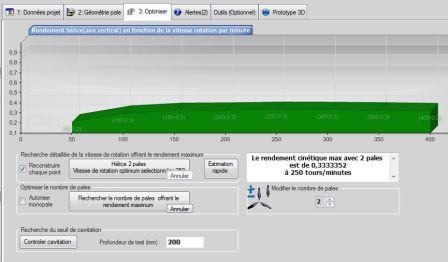
The « 3: Optimize » tab: the curve shows efficiency versus rotation speed, and the box on the right announces here a maximum kinetic efficiency with 2 blades at 250 rpm.
To find the rotation speed at optimum efficiency, Heliciel works by iterative search. It tests a range of rotation speeds, recalculates the twist of the propeller for each one, and displays the performance for each speed in a chart. When the maximum efficiency is obtained, the propeller is updated at the optimum rotation speed.
Optimization in terms of efficiency gives us the most energy-economical propeller. It is a starting point for the study of the propeller. Installation constraints may force us to depart from the optimum rotation speed, but we will always keep an eye on the quality of our propeller through its efficiency.
The 3: Optimize tab groups the detailed search for the rotation speed giving maximum efficiency, the optimization of the number of blades and the cavitation threshold check, which takes a test depth in millimetres. The optimum speed is calculated by Heliciel; the operating point and the installation constraints remain yours.
To go further, we can see how to optimize the rotation speed and number of blades of a turbine propeller, or search speed, number of blades, radius and chords together with the genetic analysis. The same alerts can be read by an AI assistant connected through the Heliciel MCP connector, which reports them as they are.
 Global site map
 Mecaflux
 Tutorials Mecaflux Pro3D
 Tutorials Heliciel
 Tutorials Heliciel PRO CFD
 Mecaflux Store
 Compare software functions
 Quotes, Orders, Payment Methods
 project technical studies